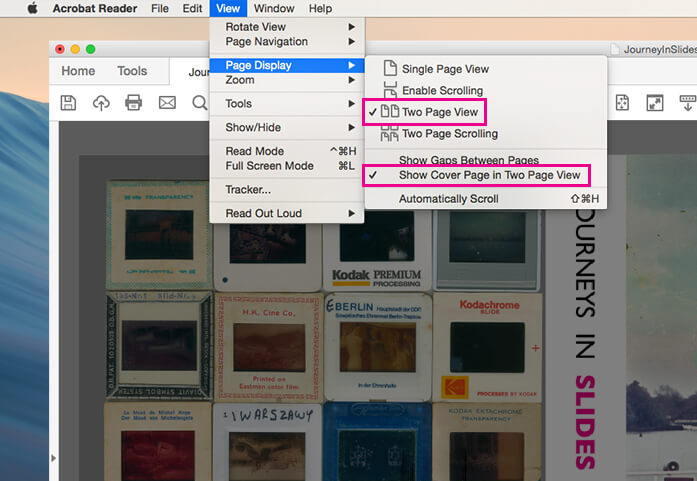
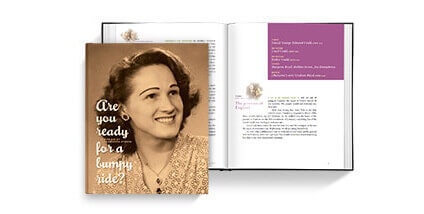
PDF to Book has arrived! We know many of you have been clamoring for the ability to make books using the design tool of your choice, and upload directly to Blurb. We got the message, and after a herculean effort from the team, PDF to Book is all yours, bringing you complete creative control in the application of your choice.
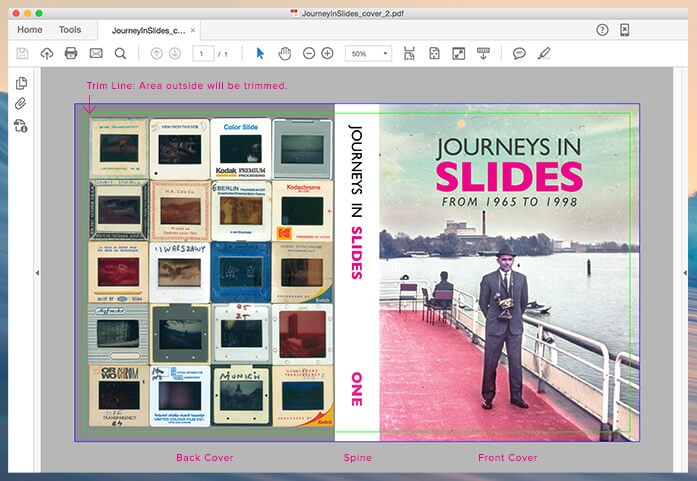
Here’s how this works: we provide you with our pre-made templates for Adobe® InDesign®, or you can use our pre-determined guidelines and specs for all our book sizes and cover types in other programs. Design your book from cover to cover in CMYK and use any native file formats (TIFF, EPS, PNG, etc) for stunning text and image quality. With PDF to Book you can also wrap your cover image, or add an image, to the spine of your book. Did we mention this is complete creative control? Rich colors, sharp text, full flexibility – PDF to Book is unlike anything Blurb has offered before.
That said, we know PDF to Book isn’t for everybody, and don’t worry – BookSmart isn’t going anywhere. In fact we’re already cranking on the next release. And whether you use BookSmart or PDF to Book, you’ll still be able to share, market and sell your book using our online Bookstore and marketing tools. If you act quickly, you can give PDF to Book a spin for your submission to Photography.Book.Now, and a chance to win $25,000 (deadline is July 16).
To get the nitty gritty details on templates and upload specs, visit our PDF to Book page, and for those of you currently attending the HOW Conference in Austin, swing by our booth to check out some books made using PDF to Book!


68 Comments
Wow, sounds good!!!
This is a question rather. Does it mean i can design a book in my own Indesign program, as long as I follow sizes and specs? And send a pdf? What version of pdf? What setting?
I’ve seen several great books by photographers and am impressed by the quality. If blurb doesn’t require any proprietary software it’s absolutely brilliant.
Hi Tore -
Yes, you can now design your book in InDesign® following the specifications we have listed and upload a PDF/X-3. You can also use our pre-made InDesign® templates! You can find all the details around PDF to Book here.
At last! Way to go Blurb!
This is what I’ve been waiting for. Right, I’m off to design my book.
How about a version for QuarkXpress? That would be sweet!
Great news about PDF to Blurb. Thank you very much for listening.
so after losing all good engineers on BookSmart side Blurb finally gave up and decided that the house-wives need to learn how to use InDesign in order to make photobooks? Way to go… to the abandonware land.
Hi Mick -
You can definitely design your book in QuarkXpress. We have all the guidelines and specifications you need to do so here!
Wouhou!!! Great news! Thank you Blurb!!!
I am so very excited to hear this. Thanks for listening to user feedback and providing this method. Can’t wait to give it a shot.
YOU GUYS ROCK!!! This is such a great improvement. I can’t wait to take full creative control of my next blurb book.
Though the PDF advantage is good news, from the sounds of the requirements it leaves those of us using older software by the side of the road. For all my existing publishing needs I get by extremely well with Adobe Distiller 5.0. My understanding is that the PDF/X-3 format isn’t supported until at least version 6.0, right? So no PDF for me? Booksmart is good software, but seems best suited for those with a minimum of computer skills, when you want to speed things up and customize, Booksmart has limitations I hope will be addressed in the future, i.e. mixing layered images and text.
still trying to figure out how to get a PDF proof out of BookSmart for my clients to okay before going to print! No way I’m gonna redo the whole thing in InDesign just to get a PDF proof! Ideas, anyone?
now I can start again to do books, sorry guys booksmart is good and well done but it was just not flexible enough for me
This is wonderful. I’ve been asked to layout a children’s book and produce one copy for presentation. I immediately thought of Blurb but had anxiety of doing layout on a program other than InDesign. This is great!
What about pdf file created in Apple Pages?
I will finally use Blurb. Thank you for the creative freedom!!
Guys, this is great news. BookSmart was not very flexible and had some horrendous system requirements for a program that does so little.
That aside, isn’t PDF/X3 and the other versions just a PDF where certain guidelines are followed (ie “no rgb, all fonts embedded, etc.)?
Perhaps a pdf that follows all the rules but isn’t spit out by InDesign can still pass muster?
Also, aren’t there various free PDF conversion sites that can crank out the required format? It worth doing a Google for those worried about such things.
As I use InDesign CS3 myself, it’s not really an issue. Again, great job on this guys, you’ve just become a contender for my business once more.
Does Blurb work with flat books?
@DFR @JOHN
I made a black and white PDF book, from an existing PDF, by using apples built in print to PDF-X to resize (and only made the cover with indesign). This worked for me because the book was all text. The problem with this option is all images will rendered 72dpi, but it shows that you do not have to use indesign as long as the final PDF is the correct size and PDF-X3. Just make sure the page size you are “printing” to matches the blurb guidelines.
Thank you, guys! I have inDesign CS3, but would love to have the design templates for Apple Pages as well. Hope that’s in the works.
Great news!
A question, though… will this fix the poor font print quality for those of us who didn’t use BookSmart for text, but whom rather imported full pages from our own files?
I guess I’m wondering if there is any additional compression done to uploaded PDF’s that may affect images/text, or is everything kept intact?
Looking forward to trying it out as I’ve been holding off since BookSmart used to compress my files too much, and printed results were not very good.
Justin -
Yes, your files are kept intact and this will likely solve the issues you previously saw from converting to JPEG for BookSmart.
For the questions regarding other apps – Yes, you can definitely make your book in other programs as long as you follow the specifications we have listed for all of our book sizes and cover types. We currently only have pre-made templates for InDesign, but PDF to Book is all about creative freedom, so use whichever program you feel comfortable with that will allow you to produce a PDF/X-3 file.
Check out the PDF to Book page that has everything you’ll need to get started.
YES! That’s a HUGE time saver!!!! Thank you!!!
Great news! This a very positive move forward. I’d stuck with Apple’s iPhoto book printing until now – I found BookSmart to be really very good but just not as easy to use after that. On the other hand I used to make a living using InDesign (and to a lesser extent still do) it’s a great piece of pro software. At last a quality service that lets us bust out of pre-made templates. Grrrreat!
[@ ANDAMANTIUM: try uploading a PDF/X-1a file- The spec is the same - except you're limited to CMYK colour - it might just work...]
Thank goodness BookSmart is staying! After publishing 20 books as a photographer and not a computer graphic artist I want to keep publishing.
thanks Natalie… that’s certainly welcome news. Look forward to my next book.
THANK YOU, BLURB. I participated in the beta program. The process was flawless and the result was indeed quite fabulously satisfying.
yaaaaay! i’m so excited! I’ve been waiting for this for a year! thanks so much, Blurb!
This is really great news, I started to design a book but lost patience with booksmart as I am an indesign girl…thanks for making it easy for us!
Finally! Oh this is going to solve all the problems we had with our last BLURB book.
hey Blurbsters
As Heather asked for (above) what I want to do is get a pdf OUT of Booksmart. At this point my data is locked into Booksmart – and you don’t own that data – I do.
So what do we have to do to get a pdf OUT of Booksmart?
woohooo!
Hi Marc -
You can create a PDF of your book from BookSmart using these directions. Answers to questions similar to yours can all be found under Help here.
Blurb, you rock!
A company that really listens!!!!
I’m curious if you know if the Creative Memories Storybook software will be compatible in PDF format. I’m thinking about acquiring this software but I want to continue to publish books with Blurb. CM books are too expensive but their software is much more advanced, flexible and intuitive than yours.
Also, I’d really love it if you published books in an 8.5×11 size! Is this size a possibility for the future?
I’ve been told that Amazon now requires self-published authors to use their own proprietary publishing program in order to be listed in Amazon Books. Does this mean that Blurb books can’t be sold through Amazon?
Dear Blurberatis at Blurb,
Blurb PDF to Book ROCKS!
Thanks!
No more firewalls to knock down!
Everything has a work around but my biggest issue with BookSmart was that I had to have my IT department shut down the firewalls and baby sit me each time I had to upload a file. Apparently, with Book to PDF this is no longer an issue.
I haven’t yet produced a book to test it out, but seems like i just need to update my flash player, and I should be in business—without my IT sitters.
If so, this is FANTASTIC!
I am pleased with this development. I don’t currently own Indesign software–so–do i need to buy it–or will I be able to essentially get the same benefiots by using blurb’s Indesign templates ??
Thanks,
I used another publisher–but would have preferred blurb–except for the limitations in temlates.
Steve
Finally!!!!
But I have another issue, I dont have Indesign, someone knows how to do it from Photoshop?
Regards,
Miguel
Wooooooooo-friggin-hoooooooooooo!!!
Does that mean you can use photoshop and convert to PDF and upload?
Hi Herbert -
You’ll have to follow up with Amazon regarding their selling policies, however you can sell your book in the Blurb Bookstore and keep 100% of the profit when you Set Your Price.
Lisa, Miguel & Steve – You do not need to use InDesign® in order to create your book. Other design programs will work – you just need to follow our specifications for your book type and upload a PDF/X-3 file to Blurb.
Thanks everyone for all the feedback!
The pdf2book is an excellent idea – I will check it out, because I have created a pdf for this year’s sofobomo.
I would like to suggest that you also provide templates for the scribus dtp programme – it is freely available under gpl for Linux, Windows and Mac and has quite some users especially in the non-mainstream (but don’t forget: bookmaking is also not mainstream…)
Very nice impruvement!
This is great! I can finally use you guy’s instead of lulu for our companies promotional materials. Your book sizes are much more what we’ve been looking to do. They just started a new book that is mini sized 3.5×2.5 I’m interested in, you might want to look into those to stay competitive.
Great news, even on my birthday! Now I am very interested in whether those nice wall papers and simple, elegant ornaments will become available (as eps or so). That would be absolutely fabulous!
That’s great! I’m so excited! BookSmart is great for people that don’t know how to use design programs but I always found it limiting because I could layout things much faster in InDesign. Thanks!
How about Quark XPress templates? When will these be along? Soon I hope. Not all of us are slaves to Adobe y’know!
This sounds great. I’ll be checking out the detail soon, in the hope of getting the creative juices going in Blurb’s direction again.
kudos
My wish has come true! :) I use InDesign at lot for my job and I’ve used Blurb to make lots of presents, digital scrapbooks, etc. Last Christmas, I got a little bit frustrated with BookSmart because there are a few features I used a lot in InDesign that BookSmart doesn’t have – I actually tried to duplicate all the templates on InDesign by hand but it got tedious and didn’t work out the same way. THANK YOU BLURB!!! I love how you guys are always improving!
WOOHOO, now I can get back to my book-making! Thanks for the PDF option!
¿Para cuando en español?
I would like to be able to save my book in PDF format that i ve created under booksmart if that would be possible and added to the next release of Blurb
It would be totally awesome..
cheers
Fantastic!
This was something I really, really wanted after recently designing my first photobook through wit Booksmart… Now the next one will be much more inspiring to put together.
Just discovered the Edit Layout feature. Looks like this will also allow for almost unlimited design options without having to purchase InDesign. Is this correct?
Related question: Is the quality of text and images better when submitting a PDF/X-3 file from Indesign rather than using Booksmart “as is.”
Thanks!
can you please support the open-soucre movement and make a template for the cross-platform open source dtp scribus?
You wrote about CMYK using pdf2book. I don´t use this color space, only sRGB – is there some problem with using sRGB color space with
TIFF,PNG,etc. when creating pdf ?? Thanks.
I read through a blurb site about ICC etc, so If I prepare a book in pdf in inDesign (sRGB, not converted to CMYK, which will be made automatically by HP5000) it should look OK when preparing images
on HW callibrated EIZO HD2442 in sRGB. (and proof view in Photoshop – HP indigo ICC profile). Is my hypothesis right?
Yay! Thanks for listening to your loyal users. As a design pro, I can now take you much more seriously.
I just taught a ‘making a blurb book’ workshop today and told my class about this new improvement and gave them the link to the PDF info.
Now, if only the covers on the soft cover books would stop curling…
Wow this could be really great. I still haven’t done a book using blurb simply because of the design limitations, and that text is not true text, but a jpeg of text which made it a bit fuzzy.
If only Blurb would add more sizes! =)
Can we make a pdf from a blog too? a blogspot.com blog on the web? does it go in the “normal” book order?
Natalie -
Can I submit a pdf X-1a format, or is pdf X-3 the only supported format?
Otherwise, great idea! I’ve been waiting for something like this.
Bless you, Blurb, for listening! Looking forward to trying it. Not sure how to make a separate front/back cover with spine using Aperture, but we’ll see…
How do I stop the preflight check and the pdf uploads? The notice of the preflight is in progress now for 5 days. I want to stop it and use other software. This is MORE than annoying.